LSPedia OneScan

LSPediA - Service Level Agreement

Created on Fri, 29 Mar, 2024 at 1:56 PM • Liquid error: can't modify frozen String: "Translation missing: en.portal_translations.updated_on"

LSPediA - Service Level Agreement


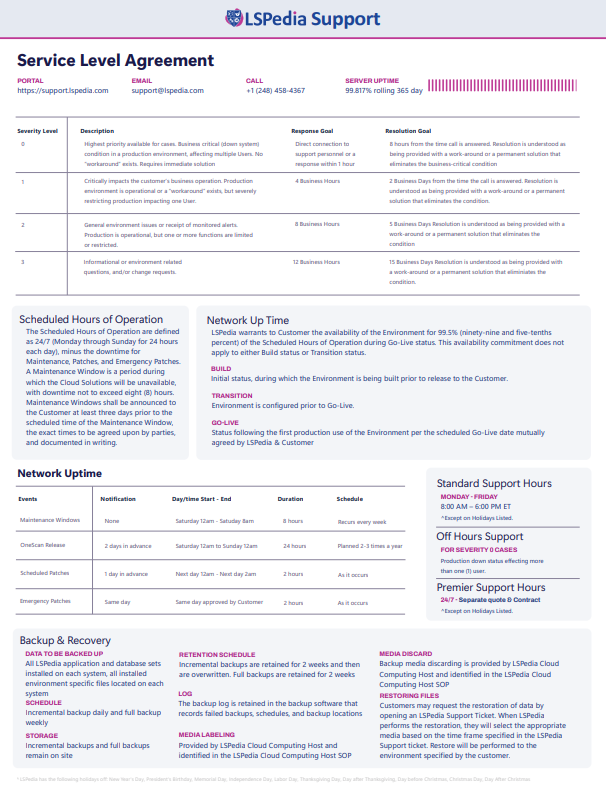
When entering tickets into the support portal (freshservice) please adhere to the SLA Priority description found in the table below. Please read each priority description and make sure the priority level you assign matches the description thoroughly.  This will allow us to properly track the LSPediA’s performance level and LSPediA’s adherence to the SLA. Please keep in mind that by assigning the appropriate priority level doesn’t change the outstand level of support that LSPediA provides it just allows us to address issues in the priority they should be addressed in.


LSPEDIA Subscription service provides the following support


Environments           

LSPEDIA will provide one production environment and one non-production environments. The service levels outlined in this Annex 1 apply to the production Environment only.


Network Up Time

LSPEDIA warrants to Customer the availability of the Environment for 99.5% (ninety-nine and five-tenths percent) of the Scheduled Hours of Operation during Go-Live status. This availability commitment does not apply to either Build status or Transition status.

Environment availability statuses are defined as follows:

  • Build – the initial status, during which the Environment is being built prior to release to the Customer.
  • Transition – after the completion of the Build status, during which the Environment is configured prior to Go-Live.
  • Go-Live – the status following the first production use of the Environment per the scheduled Go-Live date mutually agreed by LSPEDIA and Customer.


Scheduled Hours of Operation      

The Scheduled Hours of Operation are defined as 24/7 (Monday through Sunday for 24 hours each day), minus the downtime for Maintenance, Patches, and Emergency Patches described in section 9. A Maintenance Window is a period during which the Cloud Solutions will be unavailable, with downtime not to exceed eight (8) hours. Maintenance Windows shall be announced to the Customer at least three days prior to the scheduled time of the Maintenance Window, the exact times to be agreed upon by parties, and documented in writing.


Backup and Recovery          

Data to be backed up: All installed LSPEDIA application and database Sets installed on each system, all installed environment specific files located on each system,


Backup Schedule: Incremental backup daily and full backup weekly


Backup Storage: Incremental backups and full backups remain onsite


Backup Retention Schedule: Incremental backups are retained for 2 weeks and then are overwritten. Full backups are retained for 2 weeks.


Backup Log: The backup log is retained in the backup software that records failed backups, schedules, and backup locations.


Backup Media Labeling: Backup media labeling is provided by LSPediA Cloud Computing Host and identified in the LSPediA Cloud Computing Host SOP.


Backup Media Discard: Backup media discarding is provided by LSPediA Cloud Computing Host and identified in the LSPediA Cloud Computing Host SOP.


Restoring Files: Customers may request the restoration of data by opening an LSPEDIA Support Ticket. When LSPEDIA performs the restoration, they will select the appropriate media based on the time frame specified in the LSPEDIA Support ticket. Restore will be performed to the environment specified by the customer.


Standard Support Hours

Standard Support hours are 8:00 AM to 6:00 PM U.S. Eastern Time Monday – Friday, excluding the following holidays:

New Year's Day, President's Birthday, Memorial Day, Independence Day, Labor Day, Thanksgiving Day, Day after Thanksgiving, Day before Christmas, Christmas Day, Day After Christmas


Off Hours Support    

Off Hours Support is provided to handle Severity 0 cases that are in Production Down status affecting more than one User. Issues of lower severity are deferred to the beginning of the following business day for follow-up.  


Premier Support Hours

Standard Support hours are 24/7 excluding the following holidays. Premier support requires a separate quote and contract.

New Year's Day, President's Birthday, Memorial Day, Independence Day, Labor Day, Thanksgiving Day, Day after Thanksgiving, Day before Christmas, Christmas Day, Day After Christmas


LSPEDIA will meet the following Support Levels 


Sever­ity level

Description
 

Response Goal

Resolution Goal

0

Highest priority available for cases.  Business critical (down system) condition in a production environment affecting multiple Users. No “workaround” exists. Requires immediate solution


Direct connection to support personnel or a response within 1 hour.

8 hours from the time the call is answered. Resolution is understood as being provided with a work-around or a permanent solution that eliminates the business-critical condition.

1

Critically impacts the customer's business operation. Production environment is operational or a “workaround” exists, but severely restricting production impacting one User. 


4 Business Hours

2 Business Days from the time the call is answered. Resolution is understood as being provided with a work-around or a permanent solution that eliminates the condition.

2

General environment issues or receipt of monitored alerts. Production is operational, but one or more functions are limited or restricted. 

8 Business Hours

5 Business Days Resolution is understood as being provided with a work-around or a permanent solution that eliminates the condition.

3


Informational or environment related questions, and/or change requests.

12 Business Hours

15 Business Days Resolution is understood as being provided with a work-around or a permanent solution that eliminates the condition.


Maintenance, Patches, and Emergency Downs

Events

Notification

Day/time from

Day/Time to

Duration

Schedule

Maintenance Windows

No

Saturday 12am

Saturday 8am

8 hours

Recurs every week

OneScan Release 

2 days in advance

Saturday 12am

Sunday 12am

24 hours

Planned 2-3 times a year

Scheduled Patches

1 day in advance

The next day 12am

The next day 2am

2 hours

As it occurs

Emergency Patches

Same day

The same day approved by Customer

The same day approved by Customer

2 hours

As it occurs


Definitions

Terminology

Definition

Maintenance

Installation and administration of LSPediA systems

Maintenance Window

The time allotted for Maintenance

OneScan

LSPediA application

Release

Software release of LSPediA systems

Patch

Additional update to LSPediA systems

Emergency Patch

An urgent update to LSPediA systems


LSPedia Support Footer