
Overview
A GTIN (Global Trade Item Number) is a globally unique identification number of an item in the supply chain that identifies a product from manufacturing through distribution and use. In the US the GTIN is typically a 14-digit numeric code which includes a company prefix followed by product identification numbers.
1. Information Need
- Company’s Prefix: company receives a GS1 Company Prefix by joining a GS1 Member Organization. This gives the company the ability to create GTINs and access to the GS1 standards.
- Company’s Product (s) NDC#: The NDC, or National Drug Code, is a unique 10-digit, 3-segment number. It is a universal product identifier for human drugs in the United States. The code is present on all nonprescription (OTC) and prescription medication packages and inserts in the US.
- Types of Packaging per Item: Unit, Bundle, Case or a Pallet.
2. Create the 13 Digit#
- To create a 13 digit number that can be entered in the GS1 website to create a check digit, you will need to follow the next steps:
- Packaging Indicator. Determine if the GTIN will be generated for a unit, case or pallet.
- For unit level, use prefix "0" (zero)
- For a bundle level, use prefix "2" or "3"
- For a case level, use prefix "5"
- Add the Company's prefix to the Packaging Indicator (add the string of characters, not a mathematical operation).
- Take the NDC# and take out the company prefix and the dashes (you will end up with a 5 digit number)* and add it (again, add the string of characters, not a mathematical operation) to the Packaging Indicator and the Company's Predix.
- Packaging Indicator. Determine if the GTIN will be generated for a unit, case or pallet.
- *i.e. NDC: 69616-211-04 after taking dashes and prefix: 21104.
- By adding your Packaging Indicator, the Company's prefix and the item's NDC#, you will have a 13 digit number:
Packaging Indicator + Company's Prefix + NDC# (without dashes or prefix).
This 13 digit number is the number we need to generate the check digit.
3. Generate GTIN Check Digit
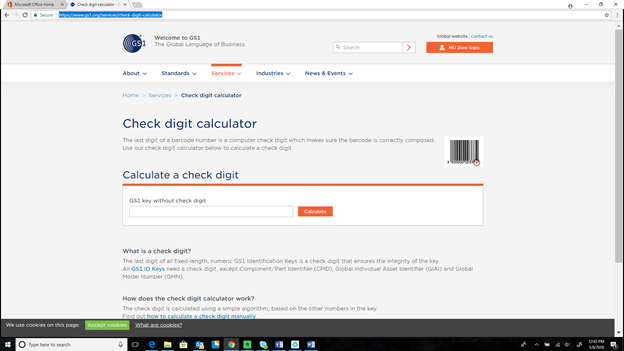
- To generate a GTIN check digit we need to go to the GS1 website, check digit calculator:
- https://www.gs1.org/services/check-digit-calculator
- Once you are in their website, you need to enter your 13 digit number that we just created in the GTIN-14 box (That is the standard for US), once you type your number you need to press the calculate button and your check digit will appear in the empty box on the right of where you enter the 13 digit number.
4. Complete GTIN#:
Now that you generated the check digit, this is the last part we need to add to our 13 digit number and get a complete GTIN:
- Packaging Indicator+Company's Prefix+NDC#+Check Digit
Now, we have a complete 14 digit GTIN Number for our item.
5. Example:
Let's generate some GTIN numbers.
- Our Company's example prefix is: "0369616"
- Our Product is: amifampridine tablets 10 mg, the NDC is 69616-211-04 and we will generate the GNTIN for the unit label "0" (zero).
First we need to create our 13 digit number:
- Packaging Indicator+Company's Prefix+NDC# (without dashes and company's prefix)

- 0+0369616+21104 =0036961621104
Now, let's enter our 13 digit number under GTIN-14 in the GS1 check digit calculator and press "calculate".

The GS1 Check Digit Calculator gives us back a result of "1" (one), now that we have the check digit, let's add it to our 13 digit number:
- 0036961621104+1 =00369616211041
The Complete GTIN number for our item at the unit level is:
- 00369616211041
Product | NDC | Description | Level | 13 Digit Number | GTIN |
|
| Firdapse, 10 count blister pack
| unit package
| 0036961621104 | 00369616211041 |
|
|
| case/shipper
| 5036961621104 | 50369616211046 |
|
|
| pallet
|
|
|