Handling Transition Inventory with OneScan
Description:
Transition Inventory refers to serialized products that were received under compliant DSCSA lot tracing but without the EPCIS data before November 2024. This includes serialized products received from trading partners that did not send any data, sent data but the data failed, or sent data but the data is not in OneScan. Returned saleable serialized products after VRS verification can also be restocked as Transition Inventory, provided they were purchased before November 2024.
What's expectation for Transition Inventory?:
Transition Inventory can be sold before and after November 2024 with proper system capabilities.
Solution Steps:
OneScan has built-in transition inventory capability.
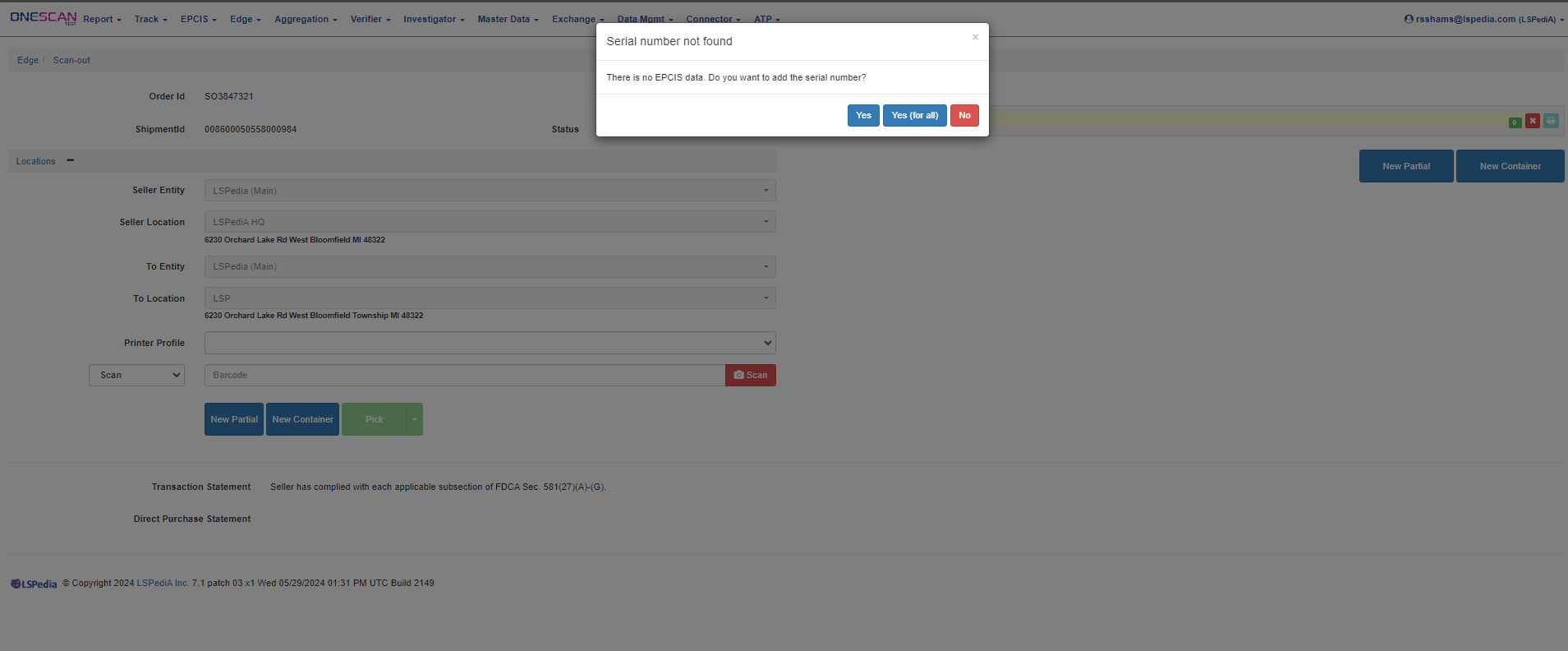
- Use Edge/Scan-out, open the outbound order,and scan the transition inventory product.
- The screen will display: t'Serial number not found: There is no EPCIS data. Do you want to add the serial number? Yes Yes(for all) No"
- Select "Yes (for all)".
Additional Information:
OneScan automatically creates a pseudo commission event as described in the GSI Best Practice Guide for Transition Inventory.
When a shipment is finished, OneScan will generate an outbound EPCIS data file for your customers meeting all DSCSA requirements.
Related Articles/Links: